



Xactimate®

Xactimate® magicplan integration

Estimating

Estimating

Software

Software

Verisk Xactimate® Logo magicplan Integration

About the integration

This integration connects magicplan sketches and photos to Xactimate®. It allows restoration and insurance professionals to export property data as ESX files for immediate use in claims estimating.

This integration connects magicplan sketches and photos to Xactimate®. It allows restoration and insurance professionals to export property data as ESX files for immediate use in claims estimating.

What it does

  • Export floor plan sketches from magicplan to Xactimate® as ESX files

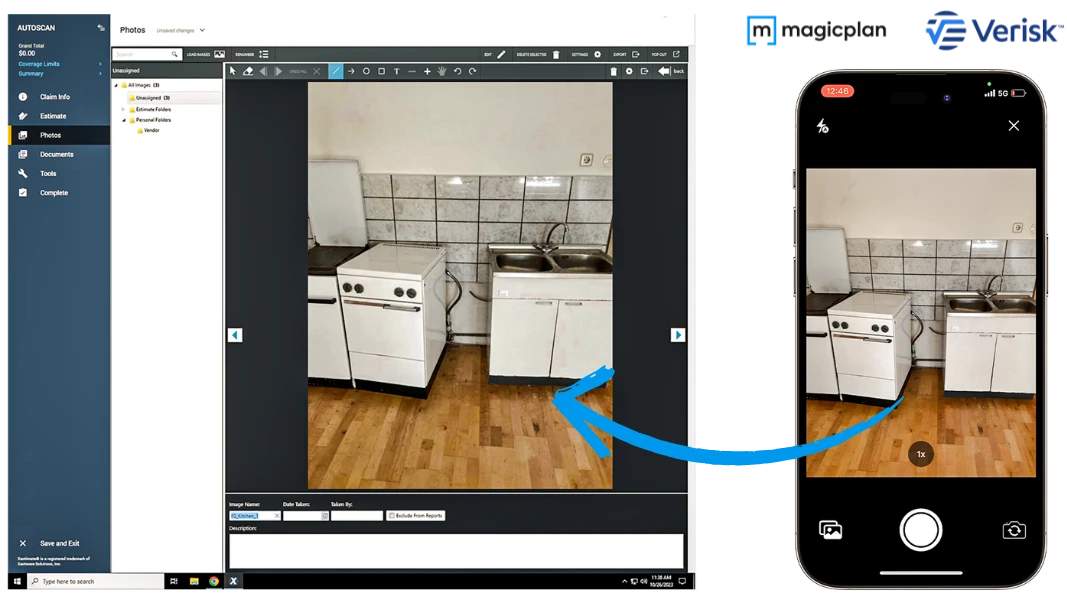
  • Transfer on-site photos directly into the Xactimate® estimating workflow

  • Provide precise dimensions for calculating material waste, labor, and depreciation

  • Receive exported files in your inbox within seconds for immediate upload

What's included in the export

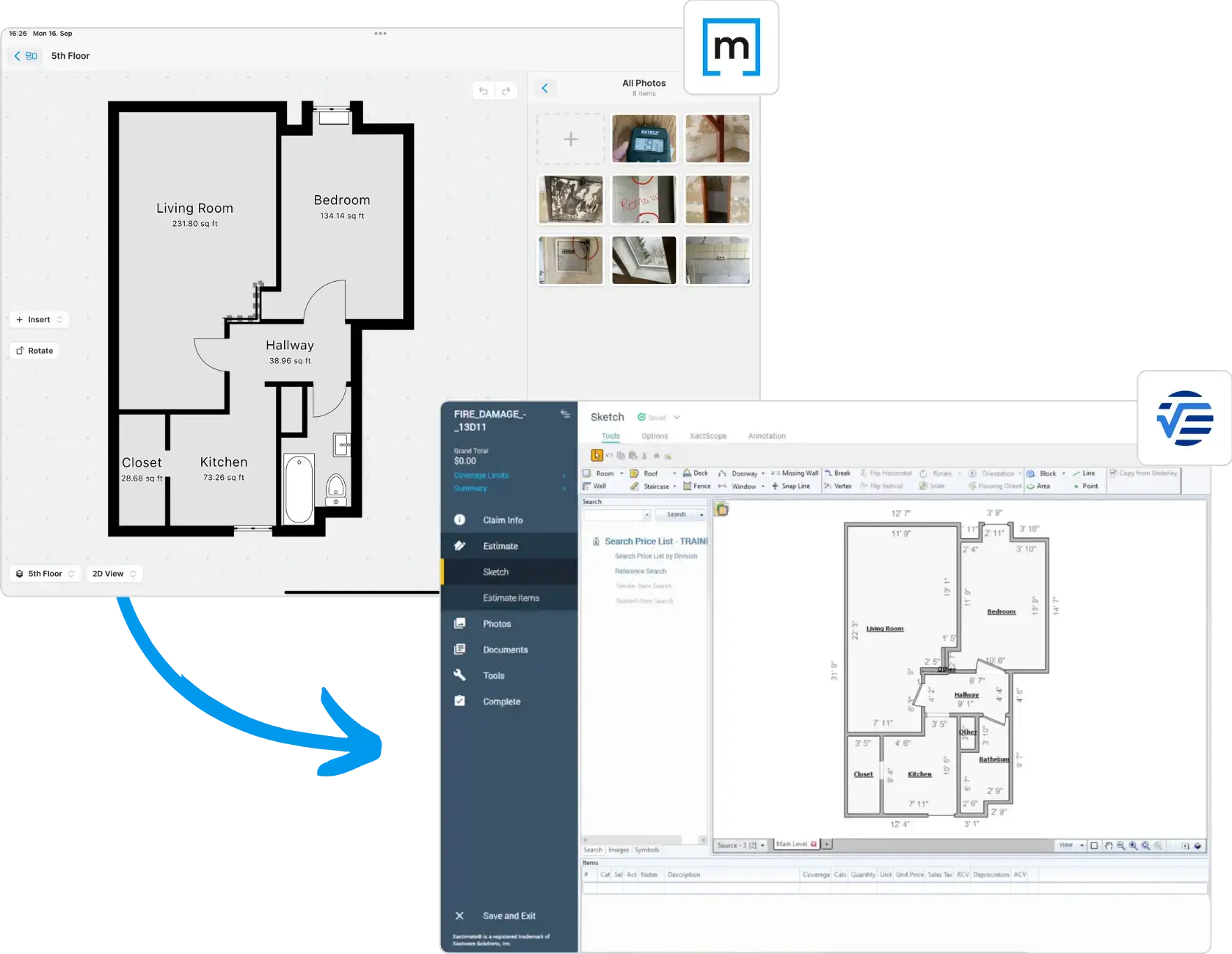
  • Floor plan sketch with precise room dimensions

  • Windows and doors (note: sub-types are not distinguished; all styles appear the same in Xactimate)

  • Objects such as furniture, cabinets, and plumbing

  • Affected areas added to the floor plan

  • Selected photos and their metadata (captions, source, etc.)

magicplan ESX sent to

How it works?

Users capture room dimensions and photos using the magicplan app. By selecting the Verisk export option, magicplan generates an ESX file and sends a download link to the user's email address. The file can also be downloaded directly from the magicplan Cloud. This file is then uploaded into Xactimate® to populate the estimate with the floor plan sketch, dimensions, objects, photos, and metadata.

Requirements

  • Active magicplan PRO subscription (the Xactimate® integration is included with PRO plans)

  • Active Xactimate® account

  • Access to magicplan mobile app or Cloud

How to set it up

  1. Open the magicplan app on a mobile device.

  2. Complete a room scan or floor plan sketch.

  3. Tap the export button within the app (under "Files and Sharing") or through the magicplan Cloud (via the project floor level under "Files & Sharing").

  4. Select the "Verisk" or "Xactimate®" export option.

  5. Configure export settings: enable or disable photos, and choose whether to compress photos to reduce file size.

  6. Check your email inbox for the download link to your ESX file, or download it directly from the magicplan Cloud.

  7. Save the ESX file to your computer.

  8. Open Xactimate® (Online or Desktop) and upload the ESX file to your specific claim or project.

Frequently Asked Questions

How do I activate the Xactimate® integration?

The integration must be enabled by our integrations team before use. Simply contact our Sales Team, and they’ll help you get set up and ready to export your floor plans directly from magicplan to Xactimate®.

What file format does magicplan use for Xactimate?

The integration generates an ESX file, which is the standard format for importing sketches and data into Xactimate.

Is there a waiting period to receive the exported file?

No. The ESX file is delivered to your registered email address within seconds after you trigger the export.

What specific project details are included in the export?

The export includes the full floor plan sketch with dimensions and all photos captured within the magicplan project.

Who can use the Xactimate® integration?

The integration is available to all users with a magicplan PRO subscription. It can be applied to a Workspace, making it available to all Workspace or Team members who have been granted access. Note that it cannot be limited to specific Teams only.

What’s included in my export to Xactimate®?

When you export your project, magicplan sends all essential claim data — including floor plan sketches, room dimensions, and project photos — directly to Xactimate®. This ensures your claim estimates and reports are accurate, complete, and ready for use.

How do I activate the Xactimate® integration?

The integration must be enabled by our integrations team before use. Simply contact our Sales Team, and they’ll help you get set up and ready to export your floor plans directly from magicplan to Xactimate®.

What file format does magicplan use for Xactimate?

The integration generates an ESX file, which is the standard format for importing sketches and data into Xactimate.

Is there a waiting period to receive the exported file?

No. The ESX file is delivered to your registered email address within seconds after you trigger the export.

What specific project details are included in the export?

The export includes the full floor plan sketch with dimensions and all photos captured within the magicplan project.

Who can use the Xactimate® integration?

The integration is available to all users with a magicplan PRO subscription. It can be applied to a Workspace, making it available to all Workspace or Team members who have been granted access. Note that it cannot be limited to specific Teams only.

What’s included in my export to Xactimate®?

When you export your project, magicplan sends all essential claim data — including floor plan sketches, room dimensions, and project photos — directly to Xactimate®. This ensures your claim estimates and reports are accurate, complete, and ready for use.

How do I activate the Xactimate® integration?

The integration must be enabled by our integrations team before use. Simply contact our Sales Team, and they’ll help you get set up and ready to export your floor plans directly from magicplan to Xactimate®.

What file format does magicplan use for Xactimate?

The integration generates an ESX file, which is the standard format for importing sketches and data into Xactimate.

Is there a waiting period to receive the exported file?

No. The ESX file is delivered to your registered email address within seconds after you trigger the export.

What specific project details are included in the export?

The export includes the full floor plan sketch with dimensions and all photos captured within the magicplan project.

Who can use the Xactimate® integration?

The integration is available to all users with a magicplan PRO subscription. It can be applied to a Workspace, making it available to all Workspace or Team members who have been granted access. Note that it cannot be limited to specific Teams only.

What’s included in my export to Xactimate®?

When you export your project, magicplan sends all essential claim data — including floor plan sketches, room dimensions, and project photos — directly to Xactimate®. This ensures your claim estimates and reports are accurate, complete, and ready for use.


